To make things simple to start with, we just wanted to display a solid colour rectangle on top of the piece of paper. These are the steps we followed in order to achieve this:
Detecting the paper
This task was fairly straight forward. We use OpenCV methods of findContour in order to find points around the shape of the paper in the colour image from Kinect sensor. Having a vast collection of points was not necessarily handy, so we simplified the contour using an approximation method provided by OpenCV, approxPolyDP.
Finding 3-D coordinates
The image we received in previous step only gives us a few points and their X and Y coordinates on the camera image. Now we had to correlate these points with the depth map provided by the Kinect in order to find which depth values correspond to a given (X, Y) pair. Thanks to this mapping (again provided out-of-box by the Kinect SDK) we obtained 3-D coordinates (X, Y, Z) for every corner of the paper detected.
Translating to Ogre space
The 3-d point we obtained was still relating to what the camera and depth sensors "saw". We had to again apply Transform matrix from Ogre to our points in order to convert these coordinates to Ogre space.
Drawing the quad
Now having a set of 4 points (in case of rectangular shape) we needed to draw a quad in Ogre. This task proved the most difficult to me. In OpenCV drawing a rectangle is straightforward, just select point, width, height and done, easy.
Not in 3-D world.
I never had too much experience with 3D engines and I found it difficult to think in terms of triangles. Everything has to be a triangle. Not only that! Ogre draws everything in anti-clockwise order around the origin, if this order is not correct, rendering goes wrong.
To make things even more complicated, there are three modes of drawing triangles (illustrated below):
- triangle list - where every triangle point is specified explicitly
- triangle stripe - where first triangle points need to be specified, and then every additional points creates new triangle
- triangle fan - where central point is selected and further points draw triangles around that point
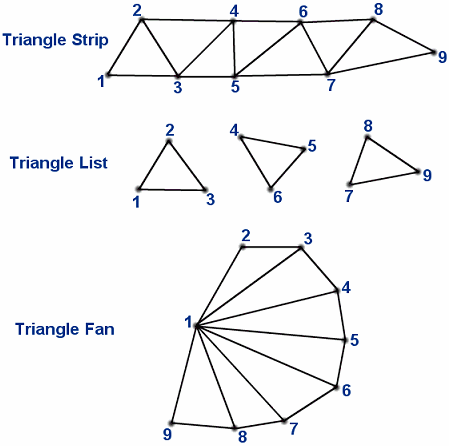 |
| Image taken from http://www.vrarchitect.net/anu/cg/surfaceModeling/polygonMesh.en.html |
This week we were only able to draw a quad and translate it to the position detected, which is not yet exactly what we are aiming for, because that way we couldn't resize or rotate the quad if the paper orientation changes, but we hope to finish the projection early next week. The video below demonstrates what we implemented:

No comments:
Post a Comment