Sunday, 26 October 2014

Second workshop: further brainstorming

During the second workshop, we were presented available equipment. We were offered to use projectors, Occulus Rift virtual reality glasses, Kinect, Arduino boards or Intel Galileo.

Our idea wasn't fully set at that moment so we used our time to talk about what we wanted to do for the project. We discussed our ideas for virtual keyboard with lab assistants. However it turned out that most of the proposals we came up with were already implemented or tested in some form and in general re-inventing a keyboard was not the best way to go.

After another series of the brainstorming, we started looking at devices that could control external hardware with our finger. We wanted to create a finger worn ring that could allow detecing touch on a finger what would make it possible to perform actions on small screens, such as smart watches etc.

We found some examples of similar devices:

Plex: finger-worn textile sensor for mobile interaction - it allows eye-free interactions with a device during activities, e.g. changing songs while running.
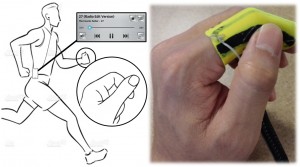
Plex


Fin: finger worn ring that turns a palm into a numerical keyboard for interactions with mobile devices


We also found a way of detecting on skin input using ultra sound, and we wanted to remove the need of wearing an entire piece of textile like in case of Plex. We found a project Sound of Touch that achieves detecting on skin input using the high frequency waves however the paper from Microsoft Research only presents example of detecting input on a forearm rather than a finger which would be much more challenging.


The equipment list we would need to collect:
  • ultra sound emitters, 
  • ultra sound receivers, 
  • motion sensors, 
  • arduino

Sunday, 19 October 2014

First workshop: brainstorming for idea

In our first interactive devices workshop I had first official meeting with my team for this unit. For next weeks I will have pleasure to work with Andres Garcia, Derek Bekoe, Adam Mooney and Dominique Tan.

Post-it notes with best ideas
We begun the workshop with introduction to brain storming. I and my team sat around a table and in a few minutes we were supposed to come up with as many ideas as we could on post-it notes. We were asked to limit ourselves to 2 or 3 words or short sentence describing the idea.

After initial phase, we introduced our ideas to other team members and we were supposed to choose around 10 best ideas. This task required to stop any criticism we might have had towards other ideas. We chose ideas ranging from virtual keyboard, to hydration monitoring wearable, to glucose level operated kitchen appliances (which was an input from one of the lab supervisors).

Idea for device notifying about electronics left in stand-by mode.
Idea for a drone that find keys for you.


Having the best ideas, we were supposed to reduce their numbers to what we thought were two best project topics. First topic that we chose was a virtual keyboard - it would allow typing on any surface. Using a glove or similar device with accelerometers on each fingers, we would be able to tell in which region of the keyboard we tried to place our fingers on. Combining regions of keyboards and most common words, we could create a keyboard that would be quick to type and possible to use anywhere.

The second topic was inspired by the "Harry Potter" novels. It would be a clock that shows what other people might be doing, where they are or how late they would be to a meeting or dinner given their current location.
Harry Potter- like clock
Virtual reality idea


In the second week of the workshops we aim to make the final choice of our project. Before we left from the workshop, we decided to share the task of finding papers and information about the two projects in order to make an informative decisions with regards to our project idea.

Sunday, 12 October 2014

Review - 'UbiGreen: investigating a mobile tool for tracking and supporting green transportation'


UbiGreen is a project that tries to answer the question of how to design for the small screen of mobile devices in order to provide feedback on people's transportation behavior and positively influence their environmental awareness. Thanks to feedback about the transportation activity, people could be encouraged to choose more environmentally friendly modes of transportation. Such an aim of this project is motivated by the fact, that in the United States the transportation is the third largest contributor to CO2 emission.


First part of the project was a formative study of the transportation habits, which consisted of two phases, an online survey and experience sampling method (ESM).  The ESM was performed in order to confirm whether participants actually act in the way they described in the survey.

After the study of habits was done, the researchers conducted a field study using the mobile application they developed called UbiGreen. The application shows iconic feedback that provides personalized awareness of the users' green actions. The icon based feedback was chosen considering the responses from the earlier study, as being the most intuitive one. The background screen of the phone was updated when "green" actions were detected. The activity was detected semi automatically - the study required to wear an additional tracking device, which was reported by participants to be troublesome, however researchers propose a mitigation to this problem by using a phone with built in accelerometer in future studies (new version is shown in the YouTube video above).

Two designs shown to two groups of study participants.
Participants were chosen from Seattle and Pittsburgh areas. It might be argued that the two areas and group size of 14 participants of varied environmental awareness is not enough to provide representative sample - in particular given that 5 of out of 14 participants were students, who might have different mobility needs than for instance people commuting to work. Also, most participants lived in urban area with proximity to bus-stops.

Lastly, the field study provided a series of interesting results that could be a guide to designers of future technology that would try to provide feedback on people's actions:

  • CO2 savings were not most important factor, people liked additional data such as calories used by walking, potential money savings
  • Participants felt that it's difficult to estimate CO2 and they would like to see a progress bar of their current "savings"
  • Participants liked a combined iconic and numerical feedback
  • Negative-reinforcement would be another useful way to influence people behavior
  • The designs of visual feedback should not be repetitive
  • Some participants felt that visual feedback was not sufficient to influence their habits w.r.t transportation
  • Real-time suggestions based on data gathered would be attractive to participants
  • Many participants naturally perceived the application and visual feedback as a game and perceived feedback as points and felt cheated if a green action was not correctly detected by the sensing system
  • Most participants did not feel that the application influenced their behaviour, stating that they were already trying to travel in pro-environment manner

Citation:
Proceeding CHI '09 Proceedings of the SIGCHI Conference on Human Factors in Computing Systems, ACM, New York, NY, USA ©2009

Project website: http://dub.washington.edu/projects/ubigreen
Paper DOI: http://dx.doi.org/10.1145/1518701.1518861

Sunday, 5 October 2014

More Than Touch: Understanding How People Use Skin as an Input Surface for Mobile Computing

I would like to review the paper "More Than Touch: Understanding How People Use Skin as an Input Surface for Mobile Computing" from CHI 2014 conference by Martin Weigel, Vikram Mehta and Jürgen Steimlefrom. Authors presented results of empirical study on how users can provide input for devices using their own bare skin as surface for touch and gestures.


Skin as the input surface has been recently the topic of many studies. Input via skin can provide a new way of interacting with devices of limited display area, such as smart watches. The authors were not satisfied by the lack of empirical research in this area in the current state of art. They were also interested in exploring different modalities than touch.

In the study, participants were asked to perform gestures on their hands in response to a set of certain standard commands such as enlarge, redo or to express emotion, for example anger. Other tasks focused on certain parts of the upper limbs or investigating other forms of inputs than gestures, e.g. typing on a virtual keyboard.


Thanks to the findings of the study, authors provide guidelines for future designers of hardware using skin as input surface. The participant often used conventional multi-touch gestures known to them from touchscreens in order to perform standard commands, which they generally perceived as easy and familiar. However, for emotional gestures, majority of participants preferred skin specific gestures, e.g. punch in the palm to express anger. Although skin specific gestures, such as skin twist, were performed less frequently, they added expressiveness. Moreover, the researches provide guidelines on most preferred touch locations and relation between location and the task performed.

This paper presents a foundation for designers of future devices using skin as input surface. There are certain difficulties yet to overcome in detecting the gestures, such as grab or pull. However I believe that we will soon see the skin gestures being used as input for many wearable devices.


Project website: https://embodied.mpi-inf.mpg.de/research/more-than-touch/
Paper DOI: http://dl.acm.org/citation.cfm?id=2556288.2557239